Listened to in the app they already have.
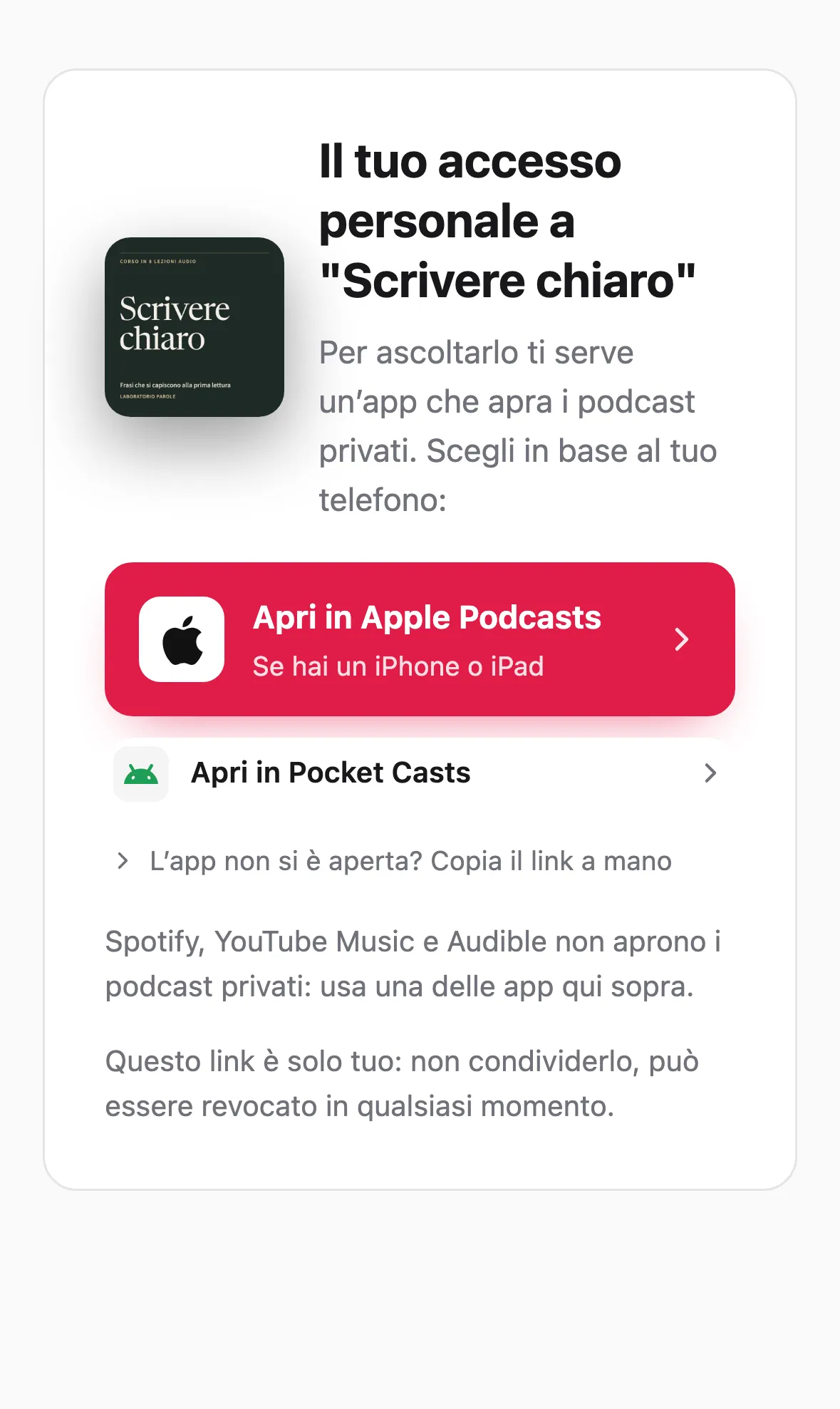
No extra account to remember. They get a link, open it in their podcast app and start: on iPhone, Apple Podcasts is already there, on Android they pick one of the free apps the welcome page suggests. The feed is private and tied to them: you decide what they see and for how long.
No card required

Plays on
- Apple Podcasts
- Pocket Casts
- Overcast
- Castbox
- Podcast Addict
From the invitation to listening
What actually happens, on the phone of the person who buys
There is no Fonaria app to install. There is an email, a welcome page, and the podcast app that person already uses, or a free one the page suggests if they do not have one yet.
The email they get
Your course
Your private podcast is ready
Hello, here is your personal access to «Your course». Open the page, pick the app you normally listen with, and from then on the episodes arrive on their own.
Open my podcastA facsimile of the invitation. The personal address is not shown here: it is the key.
iPhone and iPad
- They open the welcome page from the button in the email.
- They tap Apple Podcasts, which is already on the iPhone. If they prefer Pocket Casts or Overcast, those are there too.
- The podcast appears among their shows, and new episodes arrive on their own.
Android
- They open the welcome page from the button in the email.
- They pick one of the apps the page suggests. If they do not have one yet, they install it from there, and they are free.
- The podcast appears among their shows, and new episodes arrive on their own.
Spotify
Why private podcasts do not go on Spotify
It is our choice, and here is why. Spotify handles restricted content differently: it hosts it itself, in one catalogue that is the same for everyone, and protects only the play button. For a course or a members-only programme that changes a lot of what you have built.
The podcast
With Fonaria ·Every listener gets a personal feed of their own.
Inside Spotify ·One catalogue, the same for every subscriber.
The pace
With Fonaria ·Episodes unlock from the day each person subscribes.
Inside Spotify ·Publication dates are the same for every listener.
Privacy
With Fonaria ·Restricted episodes live only in the personal feed of whoever subscribed.
Inside Spotify ·Episode titles, descriptions and links stay visible to anyone: only playback is protected.
Statistics
With Fonaria ·The dashboard shows who is listening and to which episodes.
Inside Spotify ·Plays stay in Spotify’s statistics and do not reach yours.
The rules
With Fonaria ·Your audio stays where you put it.
Inside Spotify ·Spotify’s content rules apply, and it can remove episodes (for example ones with music).
To listen
With Fonaria ·Any podcast app that takes a private feed: Apple Podcasts, Pocket Casts, Overcast and many more.
Inside Spotify ·A Spotify account is needed, linked with an extra step.
Does Spotify not have a way for restricted content?
Yes, a partner programme, and some platforms use it. We looked at it: it protects playback, but your programme would become one catalogue for everyone, with public titles and statistics you do not see. We chose to keep the personal feed.
What about people who only use Spotify?
They pick another app from the welcome page: they are free, and on iPhone Apple Podcasts is already there. From then on new episodes arrive by themselves.
And public podcasts?
They go on Spotify normally, like on every other app.
Their app
No app of ours, and no password to remember
The biggest barrier for anyone selling content is getting people to install “yet another app”. With Fonaria that never happens: listeners use the tool already on their phone: where their headphones are paired, offline downloads work and their preferred playback speed is set.
- Works in the podcast app the client already uses every day
- No Fonaria account for listeners: the feed is the key
- Offline playback, speed and queue handled by their own app
- On iPhone, Android and computers, in any app that takes a feed by address
Plays on
- Apple Podcasts
- Pocket Casts
- Overcast
- Castbox
- Podcast Addict
Per-listener drip
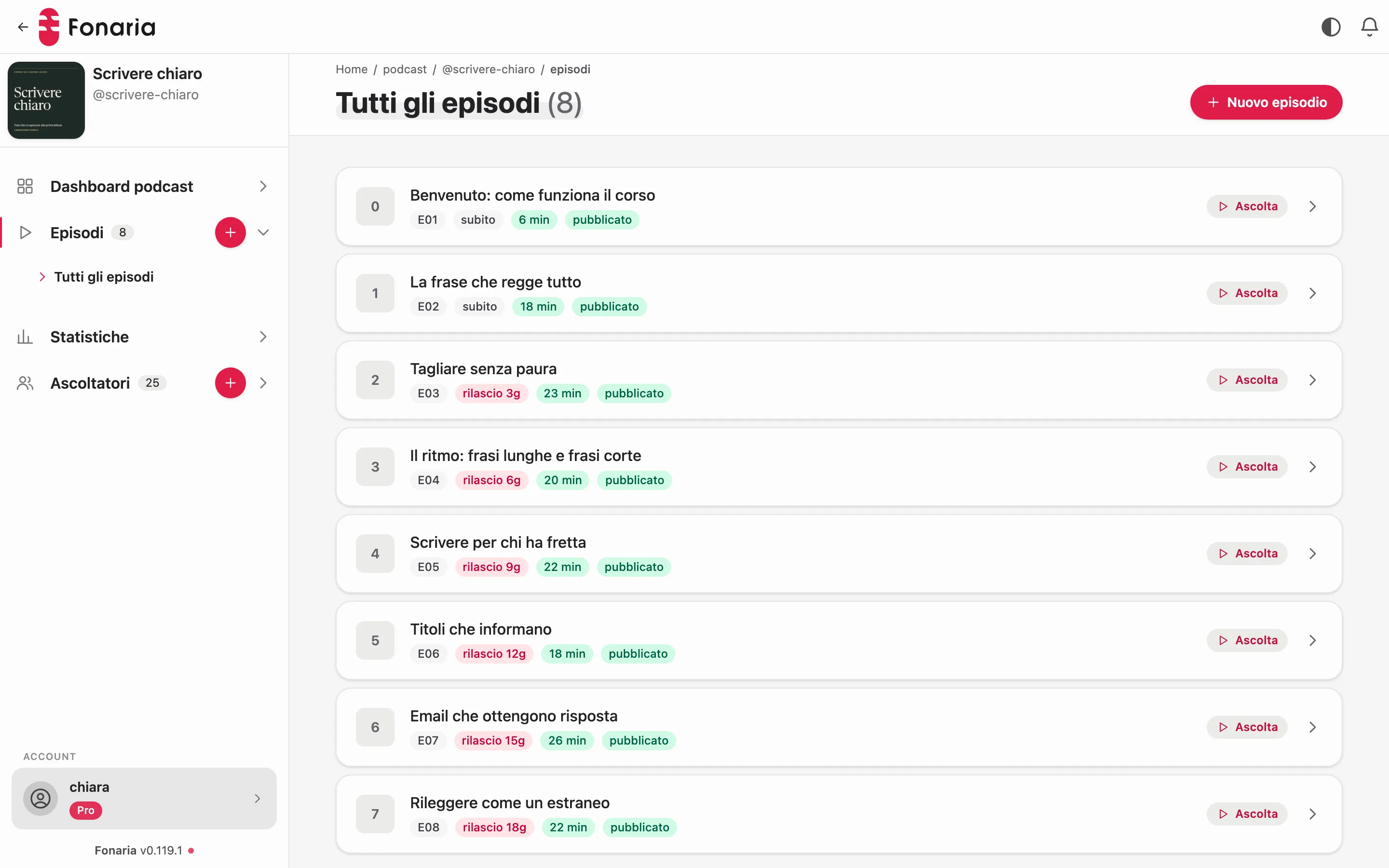
Episodes unlock over time, from each subscription date
Drip is calculated per listener, from the moment they subscribe: someone who joins today starts at episode 1, not the latest one published. A guided pace helps people finish the journey instead of dropping off after day one.
- Every listener starts at their own episode 1, whatever the date
- You set the cadence (e.g. one module a week): delivery is automatic
- Future episodes show up in the app on the day they are released
You stay in control
You decide what they see, and for how long
Beyond drip, you have fine-grained levers over each listener’s experience: always through the private feed, with nothing for them to do.
Episode expiry
Set how many days after delivery an episode disappears from a listener’s feed. Great for time-limited content, seasonal access or windowed offers.
Free preview
Open a free taster: preview subscribers see only the free episodes. On purchase they move to full access: same feed, same link, nothing to reconfigure.
Revocable access
When access ends (a refund, a cancellation, the end of a course) you revoke the feed at any time and episodes stop downloading.
Compatibility
Any podcast app, on the device they already own
Fonaria generates a standard RSS feed, read by every podcast app that takes a feed by address.
Apple Podcasts
On iPhone, iPad and Mac. The private feed is added inside the app and new episodes arrive automatically.
Spotify, public podcasts only
Your public podcasts go there normally. For private ones, the note above applies.
Pocket Casts · Overcast · Castbox
They work with private feeds, from the link on the welcome page.
Any other RSS app
It’s standard RSS: any compatible podcast player can subscribe to the listener’s personal feed.
Frequently asked
How it works, on the listener’s side
Does my client have to download a Fonaria app?
Do they need to create an account or remember a password?
How does the private podcast end up in the right app?
How does drip work for listeners?
Can I remove someone’s access?
Does it work for private podcasts, not just public ones?
Try free for 14 days
Send yourself an invitation and see how it arrives on your phone.
No card required